

Hostinger Coupan code? Now you don’t need any coupan code. Use this referal link to get discount.
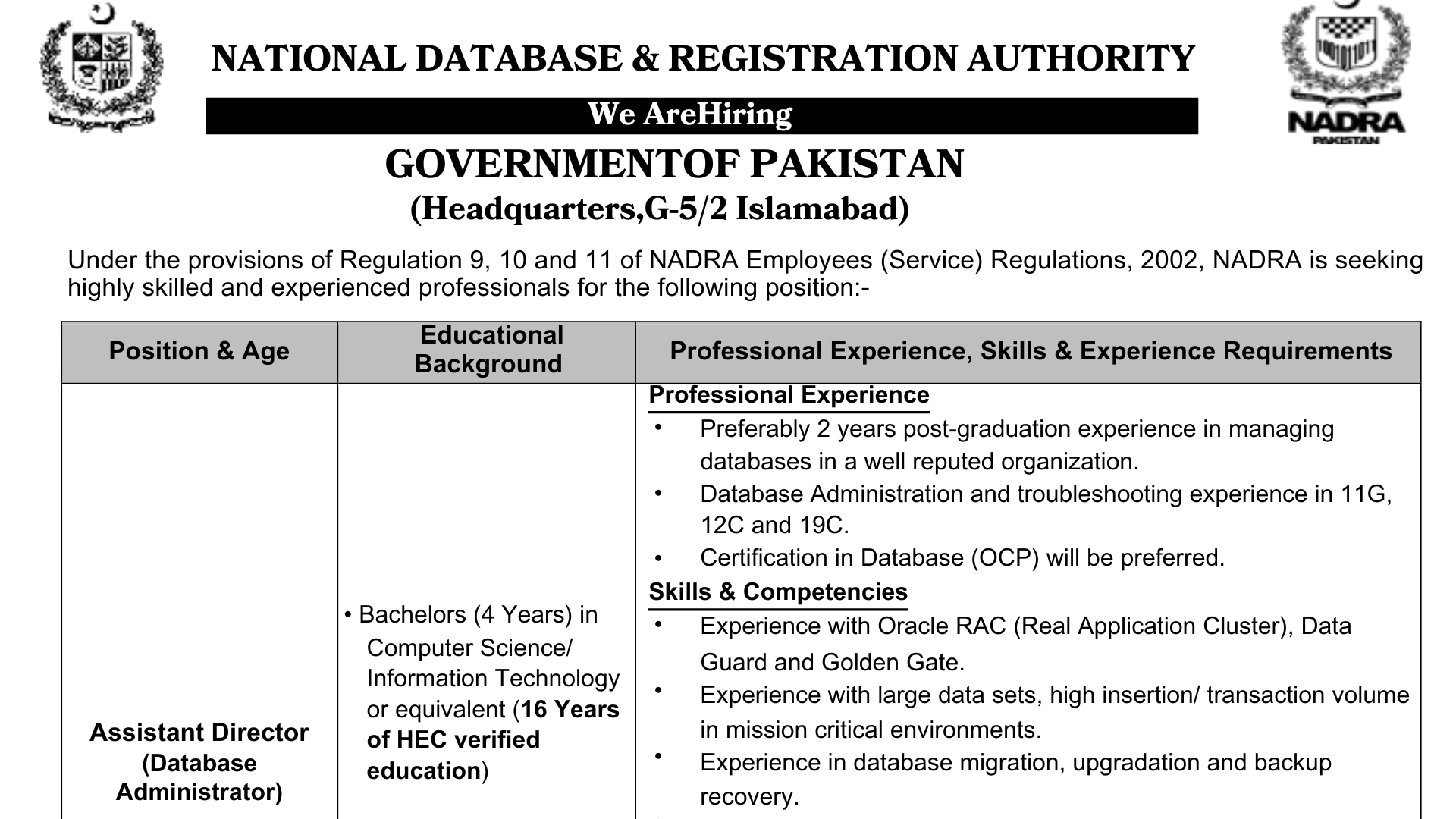
NADRA jobs Assistant Director (Database Administrator)
Position Overview: Islamabad HQ Age Limit: 37 Years 27th July 2025 The National Database and Registration Authority (NADRA) is looking for a skilled and motivated Assistant Director (Database Administrator) to join its Islamabad team on a five-year contract, with the possibility of extension. If you are passionate about managing high-performance databases in critical environments, this is your chance to make an impact at a national level. Educational Qualifications Professional Experience Required Technical Skills You need a minimum of 16 years of education, with a Bachelor’s degree (4 years) in Computer Science, Information Technology, or a similar discipline recognized by HEC. Preference will be given to candidates with a Master’s degree. All academic credentials must be attested by HEC during the interview. You must have at least 2 years of post-graduation experience in database administration, preferably with a reputable organization. Proven hands-on experience managing Oracle Databases (versions 11g, 12c, 19c) is required. Candidates with Oracle Certified Professional (OCP) certification will have an advantage. You should have expertise in Oracle RAC, Data Guard, and GoldenGate technologies. Experience in handling large data volumes and high transaction systems in critical IT environments is essential. You must demonstrate skills in database backup, restoration, migration, and upgrade processes. Proficiency in Linux OS and shell scripting is also crucial. You need to handle the installation, configuration, patching, and performance tuning of Oracle databases. You should be able to write complex SQL queries and provide technical support to development teams. Additionally, you must implement database security protocols and compliance standards. Strong skills in database monitoring, troubleshooting, and performance optimization are key. Key Responsibilities: Administer, monitor, and optimize enterprise-level databases. Ensure database availability, reliability, and security. Perform routine backups and conduct disaster recovery drills. Work with development teams for query optimization and schema design. Analyze and resolve system issues to minimize downtime. Maintain detailed documentation for system architecture and procedures. Terms & Conditions: The initial contract is for 5 years, extendable based on performance and organizational needs. NADRA reserves the right to accept or reject any application without providing a reason. Only shortlisted candidates will be contacted for a test or interview. Any misrepresentation or false information will lead to disqualification. Candidates currently employed in Government or Semi-Government institutions must submit a valid No Objection Certificate (NOC) with their application. Medical Fitness and Character Certificates are mandatory for the selected candidate. No travel or daily allowance will be provided for test or interview procedures. Electronic devices, including mobile phones and smartwatches, are not allowed during assessments. HEC-attested degrees must be presented at the interview. How To Apply? Submit Your Application at : https://careers.nadra.gov.pk Deadline: 27th July 2025 Apply Now

What is HTML 5? Model 01 Getting Started with HTML
Try it Your self <!DOCTYPE html><html><head><title>My First Web Page</title></head><body> <h1>Welcome to First Class Of HTML </h1> </body></html> model no 01: what is html? Your First Steps with HTML Ever wondered how websites are built? The secret behind every page you see online starts with something called HTML. It’s the basic building block of the web. If you’re curious about creating your own websites, this is the perfect place to begin. We’ll guide you through the basics of HTML, from what it is to creating your very first web page! What is HTML? (And Why Should You Care?) Imagine a house. Before you add furniture, paint, or decorations, you need a basic structure, including walls, a roof, and rooms. HTML is just like that for a website. HTML stands for HyperText Markup Language. It is not a programming language; it is a markup language that tells your web browser what content is on a page and how it is arranged. For example, it informs the browser: “This is a heading,” “This is a paragraph,” “This is an image,” or “This is a link.” Why should you care? Because HTML is the foundation of all websites. If you want to build anything on the web, learning HTML is your essential first step! Your Essential Tools: Text Editors and Browsers Edit Template Text Editor Web Browser To write a code we need a text editor, You can use simple programs like Notepad (Windows), TextEdit (Mac). But for beginner we will suggest following two Text Editors that you can use for writing an HTML code. Sublime Text 3 (Highly recomended for beginners) Visual Studio Code This is how you’ll see the output of your HTML code. For this purpose we can use Chrome, Firefox, Edge, Safari – any of these browsers. But we’ll recommend you to use Chrome Browser. Let’s Create Your Very First HTML Code! Step 1 Open Sublime Text 3 Download Sublime Text 3 by clicking here. After Downloading Open Sublime Text 3 editor and Add the following code in text editor. <!DOCTYPE html><html><head><title>My First Web Page</title></head><body><h1>Hello, Web World!</h1><p>This is my very first paragraph on my new website.</p></body></html> Step 2 Save the file Go to File > Save As… in your text editor. Choose a location you’ll remember (like your Desktop or a new folder called my_websites). THIS IS IMPORTANT: Give your file a name and end it with .html. For example: myfirstpage.html or index.html. The .html part tells your computer it’s a web page. Make sure the “Save as type” or “Format” dropdown is set to “All Files” or “Plain Text” if you’re using a basic editor like Notepad, otherwise it might save as a .txt file by mistake. Step 3 Save the file Go to the folder where you saved your index.html file. Double-click the file! It should automatically open in your default web browser, and you’ll see “Hello, Web World!” and your paragraph! Congratulations! You’ve just created and viewed your very first web page! 🎉 This is just the beginning of your exciting journey into web development. Stay tuned for more lessons on building amazing websites! Understanding the Basic HTML Page Structure Let’s break down the code you just wrote. Every standard HTML page has a basic “skeleton”: <!DOCTYPE html>: This line simply tells the browser that this is an HTML5 document (the latest version). It always goes at the very top! <html> … </html>: This is the root (or main) element of your web page. Everything else on your page goes inside these <html> tags. Think of it as the boundary of your website. <head> … </head>: This section holds information about the web page, but not the content you actually see. <title>My First Web Page</title>: The text inside <title> appears in the browser tab or window’s title bar. It’s very important for bookmarks and search engines! <body> … </body>: This is the most exciting part! Everything you want to see on your web page (text, images, links, videos) goes inside the <body> tags. <h1>Hello, Web World!</h1>: <h1> stands for “Heading 1” – the largest and most important heading. <p>This is my very first paragraph…</p>: <p> stands for “paragraph.” Remember: HTML uses “tags” like <p> and </p>. The first tag (<p>) opens the element, and the second tag (</p>) closes it. Most tags come in pairs!

Schwarzman Scholorship Program 2026
Apply for DAAD scholorship Terms and conditoins how can pakistani students apply ?complete information.

Daad Scholorship Study in Germany.
Apply for DAAD scholorship Terms and conditoins how can pakistani students apply ?complete information.